
Festive
Tricolor Smoke Cinematic Portrait
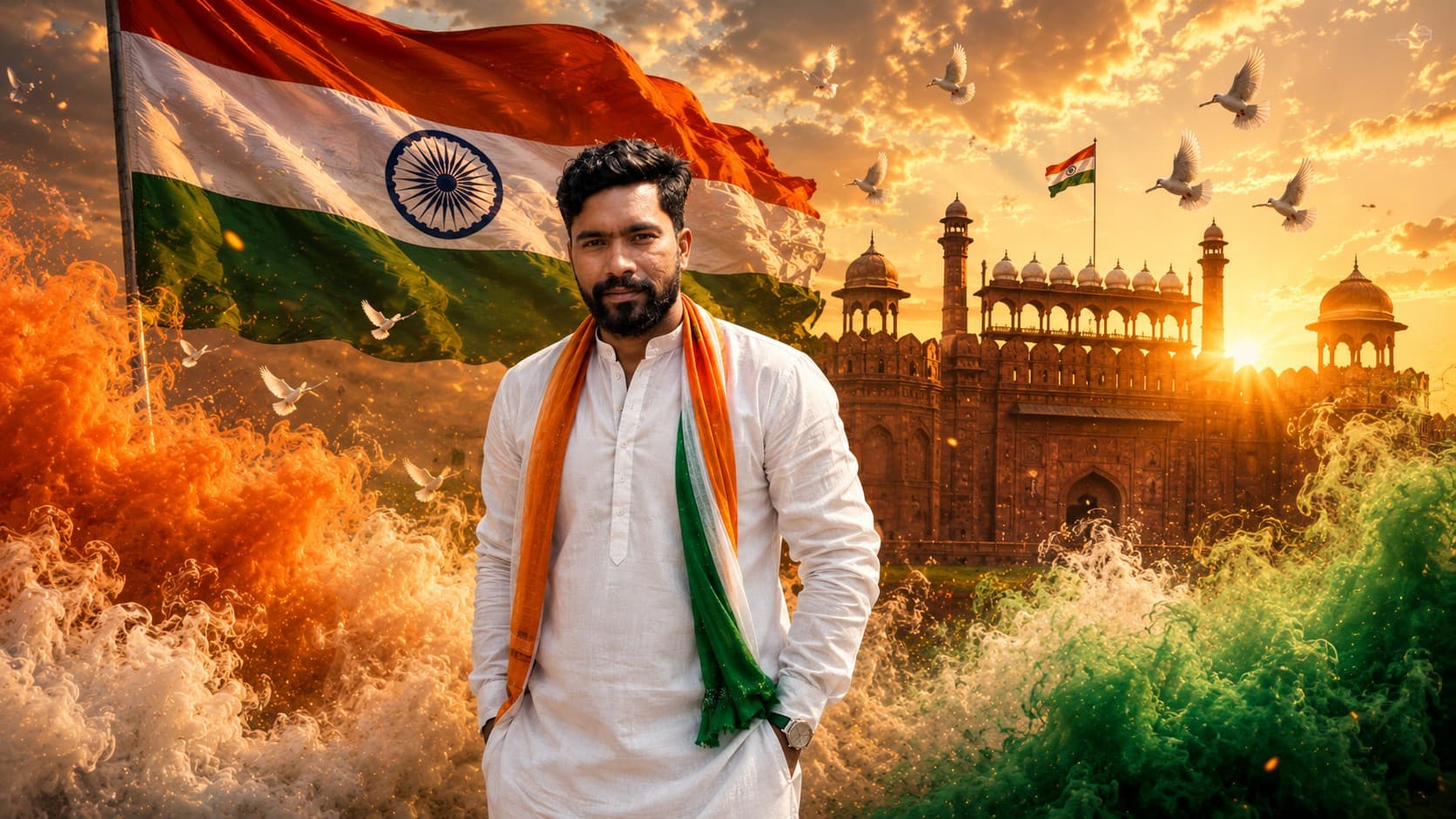
Transform your photo into a breathtaking Independence Day cinematic portrait featuring the Indian tricolor, Red Fort, dramatic smoke effects, and golden sunrise lighting.
✨ AI Image Prompt
Review the prompt below before copying it into your preferred AI image generator.
If a reference image is provided, use it as the primary subject and preserve the person's exact facial identity, facial structure, hairstyle, skin tone, eye shape, facial proportions, expression, body proportions, and overall appearance with exceptional accuracy. Ensure the generated portrait clearly resembles the uploaded person while naturally enhancing the overall cinematic quality without altering their identity.
If no reference image is provided, intelligently generate a realistic Indian person that naturally fits the requested scene, maintaining authentic facial features, realistic skin textures, expressive eyes, natural proportions, and premium editorial-quality portrait photography.
Transform the subject into a breathtaking Independence Day celebration portrait. Dress the subject in an elegant white kurta, premium ethnic attire, or a sophisticated modern white outfit that complements the person's appearance while incorporating subtle saffron, white, and green accents inspired by the Indian tricolor. The clothing should look realistic, luxurious, and naturally fitted.
Position the subject confidently in the foreground with a calm, proud, and inspiring expression while looking directly toward the camera. Maintain a natural posture that conveys confidence, dignity, patriotism, and national pride.
Behind the subject, a magnificent Indian national flag waves dramatically with realistic fabric movement. Rich saffron, white, and green cinematic smoke flows naturally around the lower part of the composition without obscuring the face or body. Thousands of tiny glowing golden particles float through the atmosphere, creating a premium cinematic environment.
Feature the majestic Red Fort prominently in the background during a spectacular golden sunrise. Warm sunlight streams through the historic architecture, producing realistic volumetric light rays, soft atmospheric haze, and dramatic cinematic shadows. Subtle Ashoka Chakra-inspired light patterns are artistically blended into the environment without appearing artificial or overpowering.
Enhance the scene with flying white doves symbolizing peace and freedom, soft drifting clouds, gentle lens flare, realistic environmental depth, premium HDR lighting, natural skin tones, ultra-sharp facial details, realistic fabric textures, shallow depth of field, cinematic color grading, premium editorial photography, and luxury magazine-cover aesthetics.
The overall composition should feel inspiring, emotional, patriotic, elegant, and world-class, resembling a premium Independence Day campaign photographed by a leading commercial photographer.
Ultra-realistic, photorealistic, cinematic masterpiece, editorial photography, luxury portrait, premium Independence Day celebration, hyper-detailed, realistic lighting, natural colors, realistic reflections, volumetric lighting, atmospheric depth, HDR, 8K quality.
Negative Prompt: identity change, different person, distorted face, inaccurate facial features, unrealistic skin, low resolution, blurry face, duplicate people, extra fingers, extra limbs, incorrect anatomy, unrealistic flag proportions, cartoon style, anime, oversaturated colors, excessive smoke covering the face, text, watermark, logo, signature, border, frame, copyright marks, artifacts, noise, low quality.
📘 How to Use This Prompt
Follow these simple steps to generate the best possible AI image.
1
Upload a Clear Portrait
Use a sharp, well-lit photo with the face clearly visible. A clean reference helps the AI preserve identity while building the cinematic Independence Day composition.
2
Keep the Subject Clearly Framed
Choose a portrait where the upper body and face are unobstructed. This gives the tricolor smoke, flag, and Red Fort enough visual space without interfering with facial details.
3
Generate the Patriotic Scene
Run the prompt without changing the main visual instructions so the model can establish the sunrise, Red Fort, flag movement, smoke, and atmospheric lighting together.
4
Refine the Visual Balance
If needed, regenerate while adjusting only one element such as smoke density, background prominence, clothing style, or lighting intensity.
⭐ Tips for Best Results
Follow these best practices to create higher-quality AI images with better consistency and realism.
✓
Use a Front-Facing Reference
A clear front-facing portrait with natural expression gives the model stronger facial information for maintaining identity.
✓
Control the Tricolor Smoke
Keep the smoke concentrated around the lower composition so the patriotic effect remains dramatic without hiding the subject.
✓
Preserve Background Hierarchy
The Red Fort and flag should support the portrait rather than compete with the face. Balanced background prominence creates a more professional campaign look.
✓
Use Natural White Clothing
White ethnic or modern clothing provides a clean visual base for the saffron, white, and green accents.
✓
Check Text-Free Variations
Generate a clean visual version first when possible, then add any required campaign typography separately for greater control over readability.
🤖Recommended AI Models
This patriotic portrait benefits from image models that handle facial preservation, atmospheric effects, detailed environments, and cinematic lighting reliably.
ChatGPT
Great for Identity & CompositionUseful when facial consistency, detailed scene direction, and controlled cinematic composition are the main priorities.
Gemini
Great for Creative VisualsA strong option for experimenting with atmospheric lighting, patriotic visual effects, and elaborate environmental compositions.
More Related Prompts
Discover more prompts from this category.
Discover More AI Prompts
Explore hundreds of free AI prompts across different categories. Whether you're creating realistic images, cinematic scenes, anime artwork, seasonal content, sports visuals, or social media graphics, PromptGenz has prompts designed to help you get better AI-generated results.