Festive

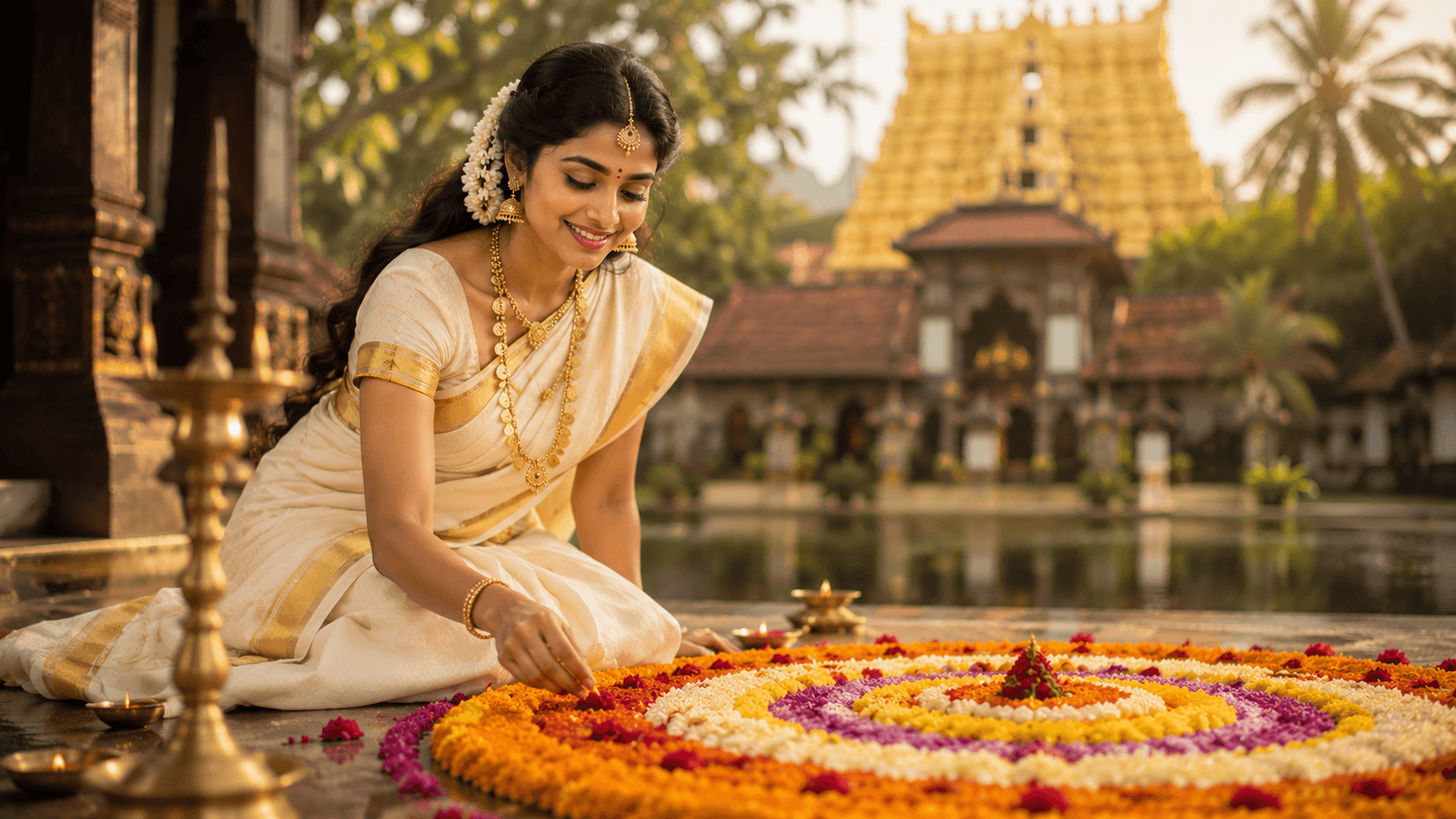
Onam Pookalam Portrait

Create an elegant traditional Onam portrait featuring a classic Kerala kasavu saree, a vibrant Pookalam flower rangoli, and a serene temple-inspired festive atmosphere.
Onam Pookalam Portrait

✨ AI Image Prompt

Review the prompt below before copying it into your preferred AI image generator.

If a reference image is provided, preserve the person's facial features, hairstyle, body type, skin tone, and overall appearance naturally. Otherwise, generate a photorealistic subject that fits the scene. Create an ultra-realistic traditional portrait of a graceful young Kerala woman celebrating the festival of Onam. She wears a classic white Kerala kasavu saree (set mundu) with a rich gold zari border, complemented by fresh jasmine flowers beautifully arranged in her hair and elegant traditional Kerala jewellery, including a gold kasu mala necklace, matching earrings, and bangles. She is seated gracefully beside a vibrant, intricately designed Pookalam (flower rangoli) crafted from fresh marigolds, roses, chrysanthemums, and colorful flower petals arranged in beautiful concentric patterns. The background features a majestic Kerala temple with a softly glowing golden gopuram, lush greenery, and warm natural daylight creating a peaceful festive ambiance. Capture a serene smile, authentic Indian skin tones, premium editorial photography, shallow depth of field, 85mm lens, ultra-realistic details, soft cinematic lighting, rich cultural elegance, and stunning 8K quality.

📘 How to Use This Prompt

Follow these simple steps to generate the best possible AI image.

1

Copy the Prompt

Click the Copy Prompt button to instantly copy the complete AI image prompt.

2

Upload the Reference Image

Upload the provided reference image together with the prompt for the closest visual result.

3

Paste into Your AI Tool

Paste the prompt into ChatGPT, Gemini, Grok, Flux, Midjourney, or your preferred AI image generator.

4

Generate & Customize

Generate the image and fine-tune clothing, lighting, colors, background, or composition while preserving the core prompt.

⭐ Tips for Best Results

Follow these best practices to create higher-quality AI images with better consistency and realism.

Use High-Quality Reference Images

Upload clear, high-resolution photos with good lighting. Better reference images help AI preserve facial features and generate more realistic results.

Generate Before Editing

Run the original prompt once before making changes. This gives you a reliable baseline before experimenting.

Modify One Detail at a Time

Change only one element such as clothing, lighting, background, or camera angle to achieve predictable results.

Use the Latest AI Model

Newer AI image models usually produce better realism, lighting, textures, and prompt understanding.

Generate Multiple Variations

Generate several versions of the same prompt and compare them to select the best final image.

🤖Recommended AI Models

These AI models deliver the best results with PromptGenz prompts for realistic and high-quality image generation.

ChatGPT (GPT-4o)

⭐ Best Overall

Excellent for realistic portraits, cinematic scenes, detailed compositions, and preserving reference image features.

Google Gemini

⚡ Fast & Creative

Great for creative prompt variations, concept exploration, and experimenting with different artistic styles.

More Related Prompts

Discover more prompts from this category.
Discover More AI Prompts

Explore hundreds of free AI prompts across different categories. Whether you're creating realistic images, cinematic scenes, anime artwork, seasonal content, sports visuals, or social media graphics, PromptGenz has prompts designed to help you get better AI-generated results.