
Name Art Studio
Neon Glow Name
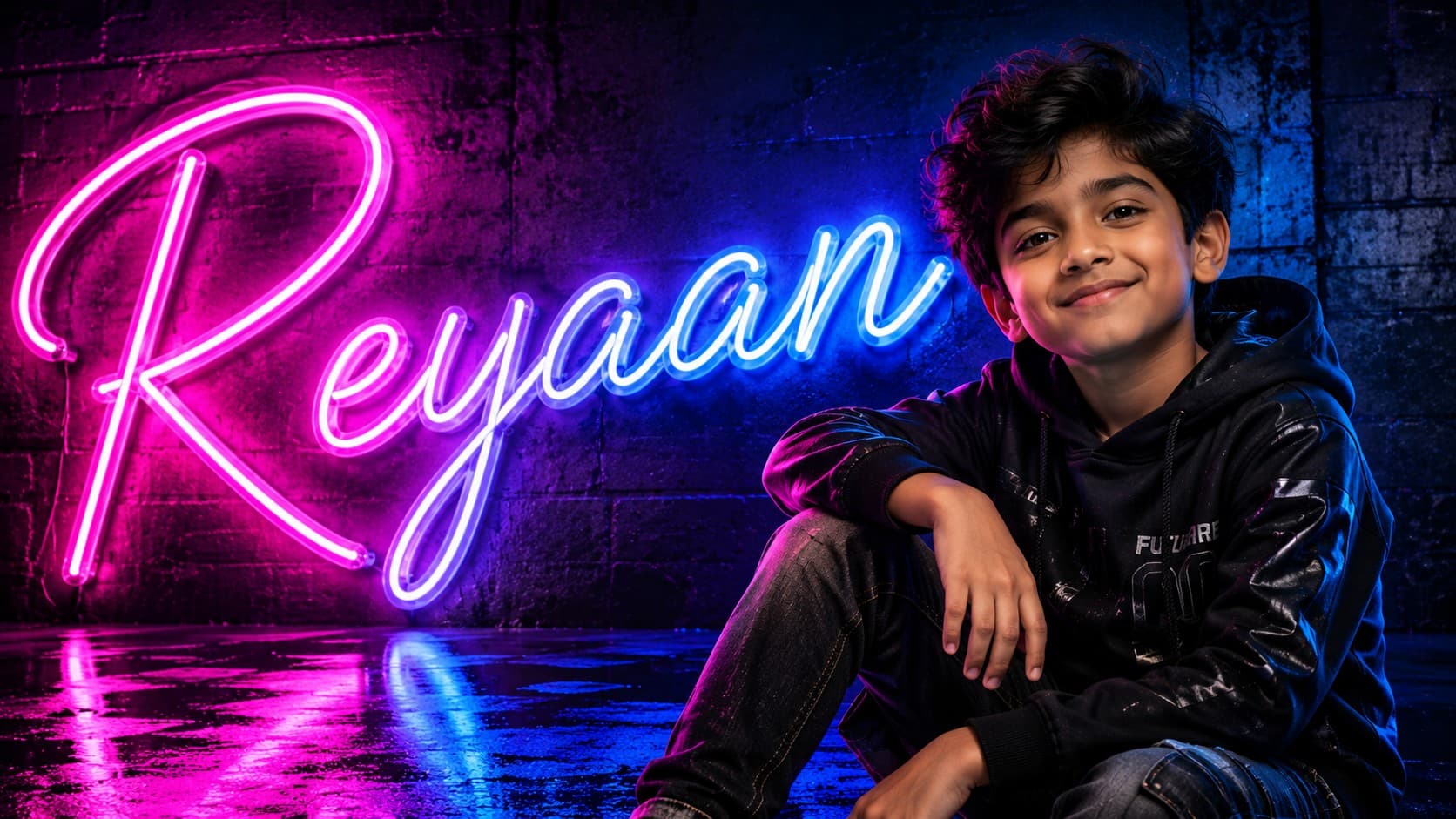
Create a vibrant portrait with glowing neon name typography in a modern urban aesthetic.
✨ AI Image Prompt
Review the prompt below before copying it into your preferred AI image generator.
If reference image(s) are provided, preserve the facial features, hairstyle, body type, skin tone, and overall appearance of the person or couple naturally while adapting them to the described scene. Otherwise, generate photorealistic subject(s) that naturally fit the scene.
Replace {{NAME}} with your desired name before generating. Display "{{NAME}}" exactly as the glowing neon typography in the final artwork.
Create a modern portrait where one oversized neon version of "{{NAME}}" glows behind or beside the subject. Use realistic neon tube lighting with vibrant blue, cyan, purple, and pink colors, subtle reflections, premium urban wall textures, cinematic atmosphere, soft ambient lighting, luxury editorial photography, ultra-realistic portrait, highly detailed, clean modern composition, 8K quality.
📘 How to Use This Prompt
Follow these simple steps to generate the best possible AI image.
1
Enter Your Name
Replace {{NAME}} with the exact name you want displayed in the artwork. Keep the spelling and capitalization as you want them to appear in the final neon design.
2
Add a Clear Portrait
Upload a clear reference image with the subject's face visible and well illuminated. A strong reference gives the model better information for preserving facial features, hairstyle, skin tone, and overall appearance.
3
Create the Neon Typography
Generate the portrait with {{NAME}} as a large glowing neon element positioned behind or beside the subject. Keep the lettering clearly readable and visually integrated with the portrait.
4
Build the Urban Setting
Allow the model to develop a contemporary environment using textured walls, colored ambient illumination, subtle reflections, and atmospheric depth that complement the neon typography.
5
Refine the Glow and Portrait
Generate additional variations and select the version with sharp facial details, readable name typography, convincing neon tube construction, realistic light spill, balanced reflections, and a clean editorial composition.
⭐ Tips for Best Results
Follow these best practices to create higher-quality AI images with better consistency and realism.
✓
Use a Front-Facing Reference
A portrait with the face clearly visible works especially well for maintaining recognizable identity while the surrounding neon environment and lighting are transformed.
✓
Keep the Name Legible
Use a short, clearly spelled name and instruct the model to preserve the exact lettering. This helps prevent distorted or incomplete neon typography.
✓
Create Realistic Light Spill
Ask for the neon tubes to cast subtle colored illumination onto the subject's face, hair, clothing, and nearby wall surfaces so the typography feels physically present in the environment.
✓
Balance Multiple Neon Colors
Blue, cyan, purple, and pink can create a vibrant atmosphere, but the colors should remain visually controlled so the glowing name enhances rather than overwhelms the portrait.
✓
Preserve Facial Detail
Keep the subject's face naturally exposed and sharply detailed while allowing the neon lighting to create atmospheric highlights around the portrait. This produces a stronger balance between identity and visual effects.
🤖Recommended AI Models
This prompt benefits from an image model that can accurately render custom typography while preserving portrait identity and creating convincing neon illumination, colored reflections, atmospheric depth, and modern editorial styling.
ChatGPT
Great for Custom Name PortraitsA strong choice for combining a reference portrait with readable custom name typography, controlled neon placement, realistic facial details, and polished cinematic lighting.
Gemini
Great for Neon AtmosphereUseful for exploring colorful neon environments, glowing tube effects, urban textures, reflective surfaces, and vibrant portrait variations around the personalized name.
More Related Prompts
Discover more prompts from this category.
Discover More AI Prompts
Explore hundreds of free AI prompts across different categories. Whether you're creating realistic images, cinematic scenes, anime artwork, seasonal content, sports visuals, or social media graphics, PromptGenz has prompts designed to help you get better AI-generated results.