
Poster & Collage Effects
Butterfly Dream Collage
Create a dreamy collage filled with elegant portraits, butterflies, flowers, and soft artistic fantasy elements.
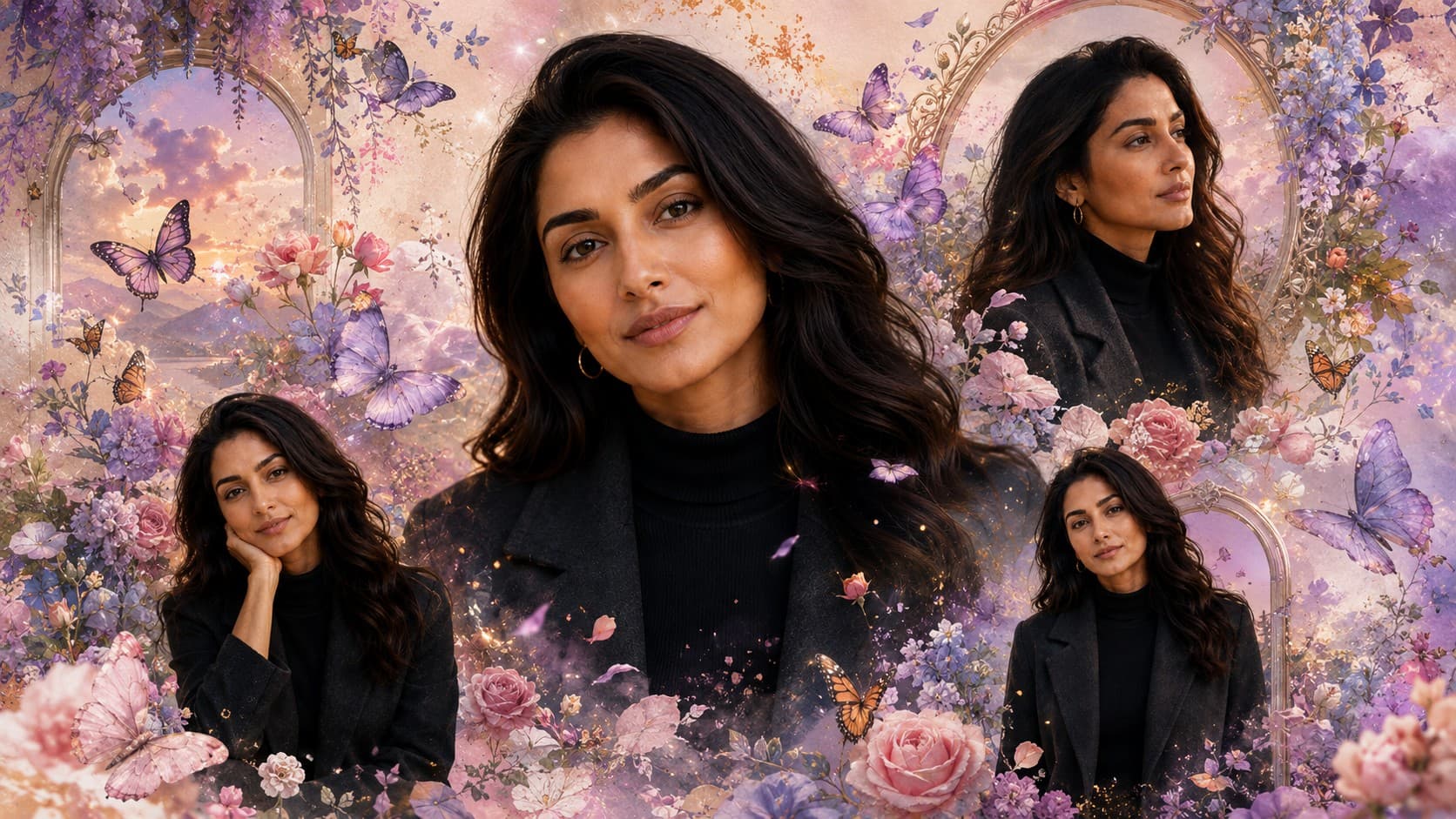
✨ AI Image Prompt
Review the prompt below before copying it into your preferred AI image generator.
If reference image(s) are provided, preserve the facial features, hairstyle, body type, skin tone, and overall appearance of the person or couple naturally while adapting them to the described scene. Otherwise, generate photorealistic subject(s) that naturally fit the scene.
Create a premium fantasy collage featuring one large portrait and multiple smaller portraits surrounded by elegant butterflies, blooming flowers, watercolor textures, soft glowing particles, pastel clouds, floral frames, and dreamy artistic lighting. Luxury portrait composition, premium editorial styling, soft color harmony, highly detailed, photorealistic skin, magical atmosphere, ultra-realistic 8K quality.
📘 How to Use This Prompt
Follow these simple steps to generate the best possible AI image.
1
Choose a Suitable Portrait
Use a clear reference image with the subject's face, hairstyle, skin tone, and overall appearance visible. A well-defined portrait helps the model maintain identity across the different portrait layers.
2
Create the Portrait Layers
Keep one large portrait as the main focal point and introduce several smaller portrait variations around it. Maintain consistent facial identity while giving each layer a naturally different scale and placement.
3
Add the Butterfly Garden
Surround the portrait layers with elegant butterflies, blooming flowers, floral frames, and delicate botanical details. Arrange these elements organically so they frame the portraits rather than covering important facial features.
4
Introduce the Dreamy Textures
Blend watercolor washes, pastel clouds, and softly glowing particles throughout the background. Keep the textures delicate and layered to create an artistic fantasy atmosphere without making the composition visually heavy.
5
Refine the Final Collage
Generate multiple variations and select the composition with the clearest facial details, strongest portrait hierarchy, natural butterfly placement, balanced floral elements, harmonious pastel tones, and polished editorial presentation.
⭐ Tips for Best Results
Follow these best practices to create higher-quality AI images with better consistency and realism.
✓
Start With a Well-Lit Face
A reference portrait with even lighting and unobstructed facial features gives the model better visual information for reproducing the subject consistently across the large and smaller portrait elements.
✓
Create Portrait Depth
Vary the size and positioning of the secondary portraits instead of arranging them uniformly. Overlapping layers with controlled spacing can create a richer collage while keeping the primary portrait dominant.
✓
Keep Butterflies Elegant
Use butterflies as framing and movement elements around the portraits. Vary their size, distance, and orientation to make the scene feel naturally composed instead of repetitive.
✓
Blend Flowers With the Artwork
Allow flowers and botanical elements to interact gently with the portrait edges and surrounding layers. Soft overlaps and watercolor transitions help unify the photographic and artistic components.
✓
Protect Facial Clarity
Keep glowing particles, floral decorations, and butterfly wings away from the eyes, nose, and mouth. Clean facial visibility gives the final collage a more refined and premium appearance.
🤖Recommended AI Models
This concept benefits from an image model that can manage multiple portrait layers while preserving identity, arranging delicate butterflies and flowers, blending watercolor textures, and maintaining a cohesive pastel fantasy composition.
ChatGPT
Great for Multi-Portrait LayoutsA strong option for organizing the large hero portrait and supporting portrait layers while maintaining recognizable facial features and creating a polished fantasy collage composition.
Gemini
Great for Fantasy DetailsUseful for experimenting with butterfly arrangements, floral surroundings, watercolor textures, pastel clouds, glowing particles, and soft dreamlike visual effects.
More Related Prompts
Discover more prompts from this category.
Discover More AI Prompts
Explore hundreds of free AI prompts across different categories. Whether you're creating realistic images, cinematic scenes, anime artwork, seasonal content, sports visuals, or social media graphics, PromptGenz has prompts designed to help you get better AI-generated results.