
Poster & Collage Effects
Double Exposure Poster
Create a cinematic double exposure artwork that blends dramatic portraits, landscapes, and premium editorial storytelling into a stunning poster.
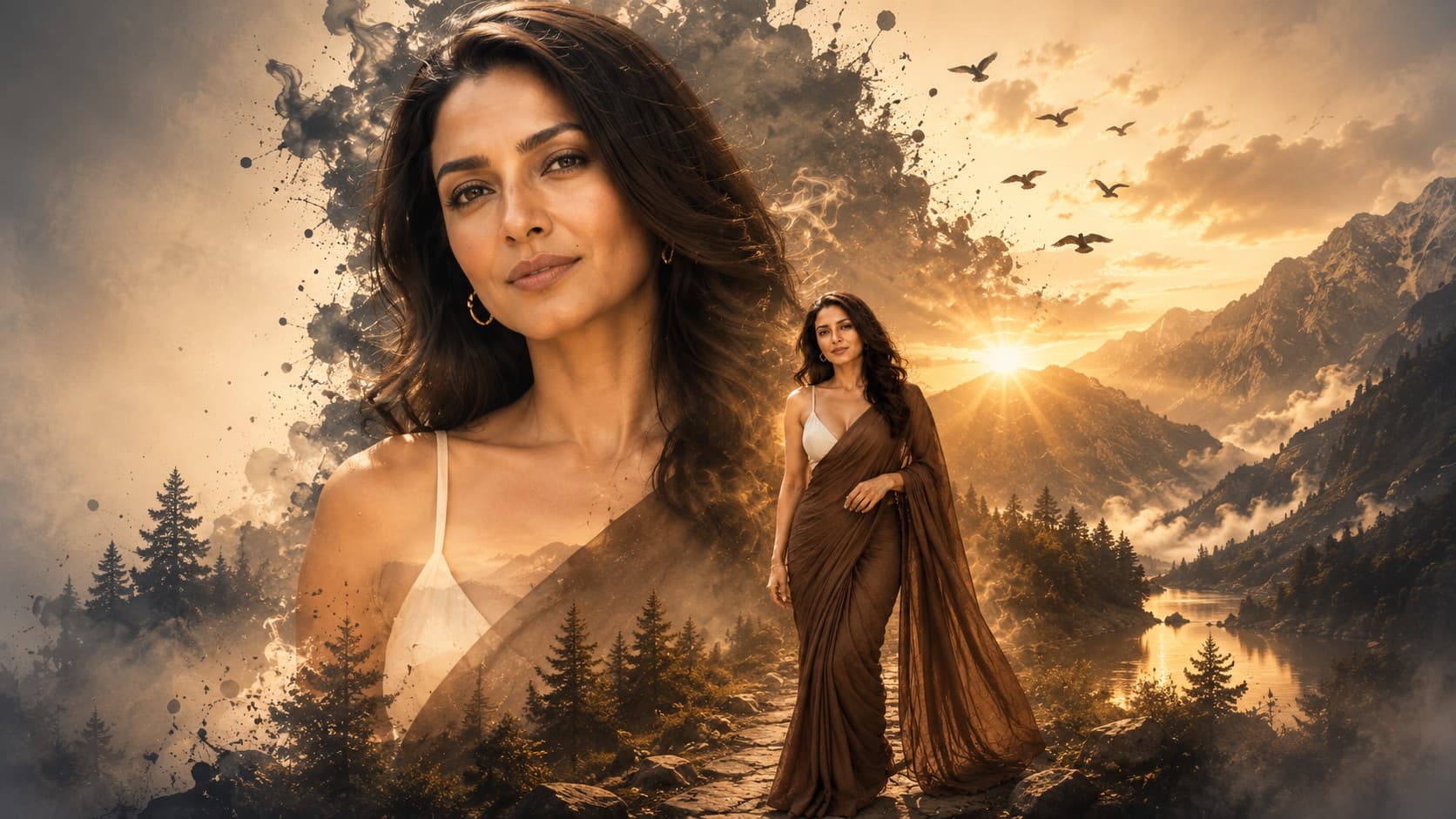
✨ AI Image Prompt
Review the prompt below before copying it into your preferred AI image generator.
If reference image(s) are provided, preserve the facial features, hairstyle, body type, skin tone, and overall appearance of the person or couple naturally while adapting them to the described scene. Otherwise, generate photorealistic subject(s) that naturally fit the scene.
Create a premium double exposure poster featuring one large close-up portrait seamlessly blended with a smaller full-body portrait. Integrate cinematic landscapes, soft smoke textures, glowing light rays, subtle birds, mountain silhouettes, and elegant atmospheric elements into the composition. Luxury editorial photography style, ultra-realistic skin, dramatic lighting, rich color grading, artistic depth, premium mixed-media design, high-end commercial poster aesthetic, highly detailed, photorealistic, 8K quality.
📘 How to Use This Prompt
Follow these simple steps to generate the best possible AI image.
1
Select a Strong Portrait Reference
Choose a clear reference image with the subject's face, hairstyle, proportions, and overall appearance easily visible. A clean portrait gives the model a reliable foundation for constructing the layered poster composition.
2
Establish the Portrait Hierarchy
Use the reference as the identity anchor for the dominant close-up portrait while introducing a smaller full-body version as the secondary visual layer. Keep the larger portrait clearly recognizable and visually dominant.
3
Blend the Landscape Elements
Allow mountain silhouettes, atmospheric landscapes, drifting smoke, birds, and luminous rays to emerge naturally through the portrait rather than appearing as separate pasted images. Keep the transitions soft and visually cohesive.
4
Build the Cinematic Poster Mood
Refine the composition with dramatic directional lighting, atmospheric depth, rich cinematic tones, and controlled contrast. The background elements should support the portrait without competing with its facial details.
5
Create the Final Editorial Composition
Generate several variations and choose the version with the strongest facial clarity, convincing double-exposure blending, balanced portrait scale, clean atmospheric transitions, and polished commercial-poster presentation.
⭐ Tips for Best Results
Follow these best practices to create higher-quality AI images with better consistency and realism.
✓
Use a Front-Facing Portrait
A well-lit portrait with a clearly visible face works especially well because the double-exposure layers need recognizable facial structure to remain convincing after the landscape elements are introduced.
✓
Keep the Main Face Dominant
Make the close-up portrait the strongest visual anchor and keep the secondary full-body figure smaller. This hierarchy prevents the composition from becoming visually crowded.
✓
Use Atmospheric Transitions
Blend the mountains, smoke, and light rays gradually through the portrait using soft edges and natural transparency. Avoid hard boundaries that make the double exposure look like a simple photo overlay.
✓
Control the Background Detail
Keep distant landscapes, birds, and atmospheric textures subtle enough to support the storytelling. Excessive background detail can reduce facial clarity and weaken the premium poster aesthetic.
✓
Refine Light Direction
Keep the glowing rays and portrait highlights consistent with one another. Matching the direction and intensity of light across the layers creates a more believable photographic integration.
🤖Recommended AI Models
This concept benefits from an image model capable of handling layered portrait composition, identity preservation, controlled transparency, atmospheric blending, and cinematic poster art while keeping the primary face sharp and recognizable.
ChatGPT
Great for Portrait CompositionA strong choice for building the dominant close-up portrait, secondary full-body layer, and cinematic visual hierarchy while maintaining recognizable facial structure throughout the composition.
Gemini
Great for Atmospheric BlendingUseful for exploring layered landscape integration, mountain silhouettes, smoke, glowing rays, birds, and rich environmental depth within a sophisticated double-exposure design.
More Related Prompts
Discover more prompts from this category.
Discover More AI Prompts
Explore hundreds of free AI prompts across different categories. Whether you're creating realistic images, cinematic scenes, anime artwork, seasonal content, sports visuals, or social media graphics, PromptGenz has prompts designed to help you get better AI-generated results.